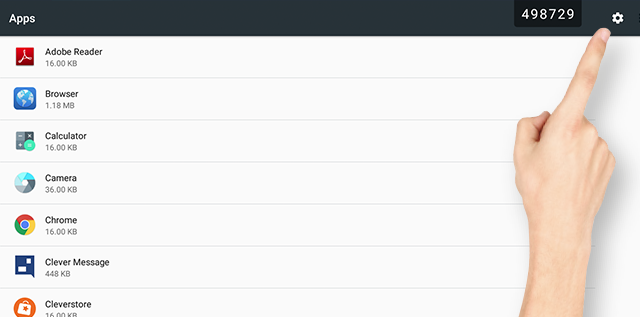
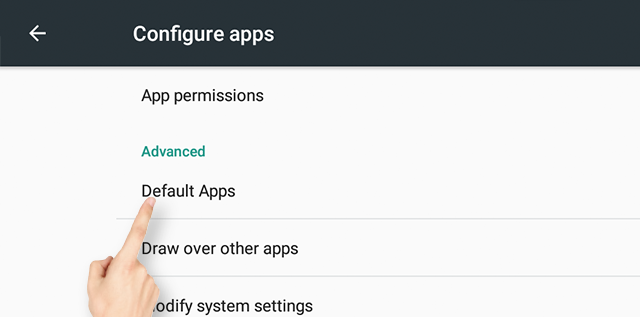
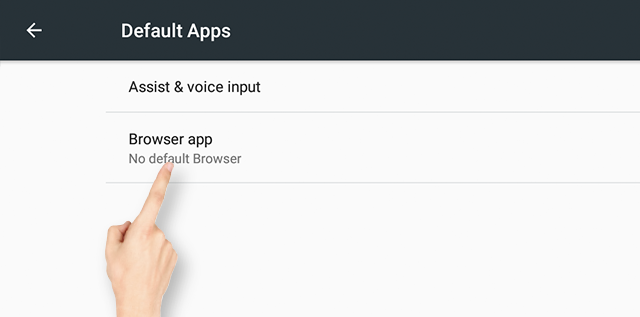
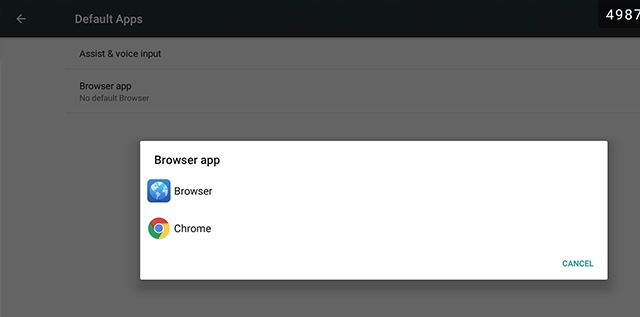
Clevertouch | Impact Plus 2 | How do I change my browser? Reno Bloodsaw 11 December 2024 16:37 Updated Follow Go to Apps and select the settings cog Choose default apps Select Browser App Select from the standard browser or Chrome Related articles Clevertouch | CleverLive Store | Frequently asked questions for the new CleverLive Store Clevertouch | Impact Plus 2 | How do I open a google enquiry over any screen? Clevertouch | Impact Plus Gen 2 | Firmware Release Notes - 10/12/2024 Clevertouch | CleverLive & CleverLauncher | Update the CleverLive and CleverLauncher Application Clevertouch | MDM | How to install apps on multiple user profiles Comments 0 comments Please sign in to leave a comment.
Comments
0 comments
Please sign in to leave a comment.